
Ironsworn’s Momentum goes up when things in the game go your way. Once you accumulate some, spend it to ignore a bad dice result a single time.
To spend (Burn) Momentum, cancel any challenge dice that are less than your Momentum value.
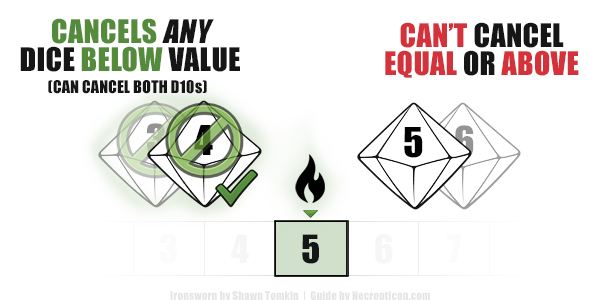
After that, Momentum track drops back to its current default value. By default, your Momentum resets to +2. Debilities can reduce that to 0.
Negative Momentum
Negative momentum has the opposite effect — it cancels an Action Die (your d6) if it matches its value.
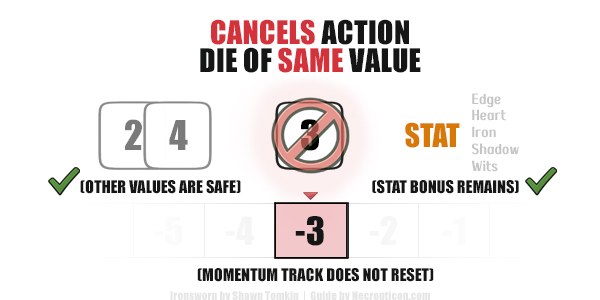
- Other dice values (greater or lesser) do not get affected.
- Your stat bonus remains.
- If it’s alone enough to beat any of the challenge dice, the result can still be a success.
- Suffering negative momentum does not reset momentum track.
- (Shawn Tomkin has confirmed this on the official Discord server.)
If your momentum is at the minimum of -6, any time you lose momentum incurs Face a Setback instead.
Debilities and Momentum
- A single debility reduces your Momentum Reset to +1.
- Two or more debilities reduce your Momentum to 0.
This means your momentum will not reset to a negative value.
- However, every debility reduces the maximum Momentum you can gain by 1.
Momentum Is Not Used for Progress Moves
Momentum mechanic is not applicable when making Progress Moves.
When you are using your Progress (number of boxes currently completed) as your Action Score, no Momentum can be Burned. On the other hand, Negative Momentum does not affect your roll either.
Alternative Way to Use Momentum (Starforged)
If you prefer it, the Starforged Burn Momentum rule should be fully compatible with basic Ironforged.
In this case, replace the Action Die (d6) with your current Momentum score instead. Then, set Momentum to its reset value (still +2 by default).
This guide references and builds upon the rules and concepts from Ironsworn by Shawn Tomkin. Please see the official source materials for the complete game and full context.
Best Ways to Track Momentum in Ironsworn
- With a printed-out character sheet, you can easily tack on a paperclip to slide up and down the vertical scale. Of course, the traditional pencil and eraser works just as well.
- If you are feeling a bit extra, a rotating wheel pinned to a cardboard or a custom-made tracker of this kind (like this one on Etsy) can make tracking a bit more satisfying.
- Tools like Iron Journal (more minimal) and Ironsworn Companion (additional features) are completely free to use and replace the hassle of needing to track your stats or to double-check how to enter your progress into the boxes.
- A minimalistic Google Sheet setup with an automated dropdown is all you need for a personal automated character sheet.
- Finally, a simple counter (that allows for negative values) is more than enough for keeping track of your stats, as long as you are able to stack multiple of them in the same interface.